Data Preparation and Caveats
Talk Outline  |
| Pileup Model |
| >Data Preparation |
| Spectral Fitting Software |
| Examples |
| Other Links |
| isis |
| ciao |
| MIT/CXC |
Before one can actually use the pileup model, one must first filter the data appropriately and then construct PHA files, RMFs, and ARFs.
Do not use level 2 files!
The most important thing to note is that you must start with level 1 files and not with level 2 files. The main reason for this is that level 2 files have had so-called afterglow events removed. For bright sources this means that 10 to 20 percent of the events from the source have been misidentified as cosmic ray events and removed from the level 2 files. Hence, you have to go back to the level 1 files. See the CIAO acis_detect_afterglow thread for information about how to keep afterglow events.
Exercise care in creating light curves
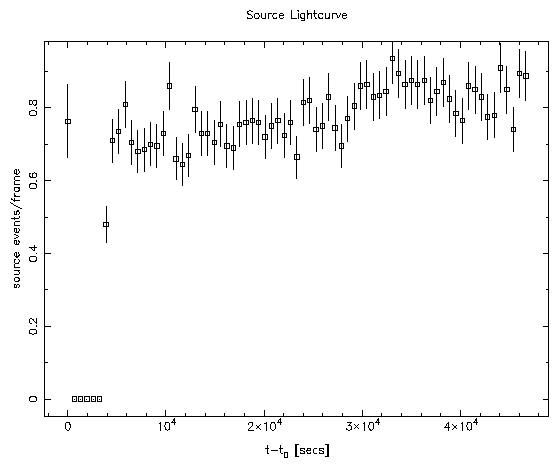
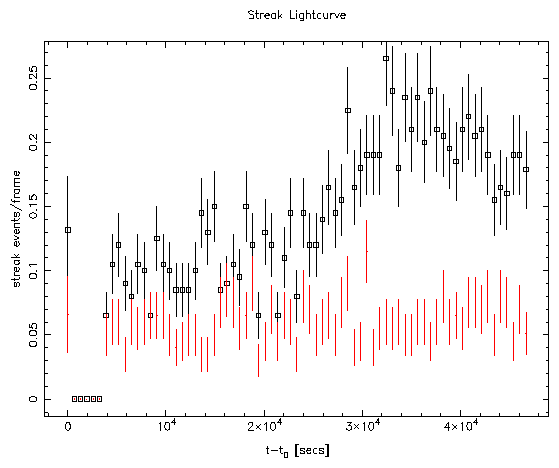
The pileup model assumes that photon arrival times are Poisson distributed. This means that lightcurves must be constructed to determine regions where the incident source flux is fairly constant. In doing so, one might be tempted to use events centered upon the source itself for the construction of the lightcurves. However, this is a bad idea since for a bright source, the relationship between the source flux and the count-rate is non-linear. Instead, use either the events in the wings of the PSF, or the events in the ACIS readout streak. To illustate this point, here is a lightcurve of II Peg (obsid_1451) constructed from the source events:
Use the right extraction region
For an on-axis point source, it is recommended that a circular region with a 2 arc-second radius be used (4 ACIS pixels). Such a region encompasses 95 percent of the incident flux and one would have to go out to a much larger radius to get the remaining 5 percent at the risk of decreasing the signal to noise ratio. Schematically, the recommended extraction looks like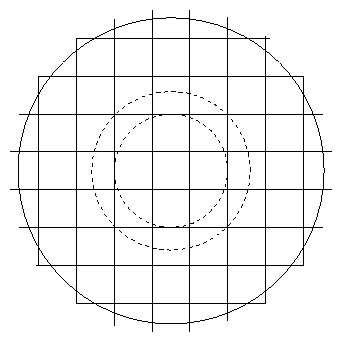
psffrac parameter to be
between 0.9 and 0.95.
Do not use a canned ARF
Usemkarf to construct the proper ARF that is appropriate for your
observation. In addition to being easy to use, mkarf takes
observation-specific dither and bad pixels into account, and writes
a value representing the fractional exposure time lost to dithering
over bad pixels to a keyword called FRACPROB. The value of the
keyword is picked up transparently by isis, but sherpa requires
the user to set it explicitly.
Get the EXPOSURE right!
The pileup model uses the frame-time and exposure time to compute the number of CCD frames. If the value of the EXPOSURE keyword in the ARF or in the PHA file is wrong, then the number of frames will be wrong, causing the pileup model to fail. It has been our experience that amkarf generated ARF has the correct value for the
exposure keyword, whereas the value in the PHA file produced by
earlier versions of CIAO was often incorrect.
For this reason isis was coded to use the value of the EXPOSURE in
the ARF and ignore the value in the PHA file. However, both sherpa
and xspec use the value in the PHA file. In any case, check the
value of the EXPOSURE keyword in both the ARF and the PHA file and
correct them if necessary. (HINT: If you are using isis, you can
also use the set_arf_exposure function to correct the
exposure after the ARF has been read in. I am not aware of any such
feature in the other two programs.)
| Previous: Pileup Model | Next: Spectral Fitting Software |


