Send data to one or more XPA servers
Integer_Type xpaset(targets, xpa_cmd [, param, param, ... [,data]])
This function is used to send information or commands to one or more XPA server(s). The return value indicates the number of application servers contacted.
        () = xpaset("ds9","file new stars.fits")
        () = xpaset("ds9","cmap","heat")
heat
colormap, discarding the return values. They also demonstrate the
flexibility with which XPA parameters may be passed to the server,
either by concatenation with the XPA command name or as distinct
comma-separated arguments.
Internally the function automatically appends all scalar parameters (char, short, integer, long, float, or string) to the XPA command name before transmission. When a non-scalar parameter argument is present (e.g. an array of floats) it will be treated as data (see the XPA documentation) for the command, and all subsequent arguments will be ignored.
The next example creates two test patterns directly from an in-memory S-Lang array:
    () = evalfile("./setup.sl");

    variable arr = Short_Type[2500];
    arr[[0:499]] = 100;
    arr[[500:999]] = 200;
    arr[[1000:1499]] = 400;
    arr[[1500:1999]] = 800;
    arr[[2000:2499]] = 1600;

    () = xpaset("ds9","frame new");
    () = xpaset("ds9","cmap rainbow");
    () = xpaset("ds9","array [dim=50,bitpix=16]",arr);

    () = xpaset("ds9","frame new");
    () = xpaset("ds9","cmap green");
    () = xpaset("ds9","array [dim=50,bitpix=-64]",log10(arr));
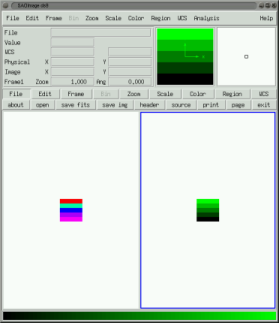
xpaset invocations sends 2500 short integers,
as binary data, to the DS9 array command, along with instructions
that it be visualized in the rainbow colormap and treated as a 50x50
image with 16 bits per pixel.
The subsequent statements generate a new image by performing a base 10
logarithmic transform of the original image, indicating how simple and
natural it can be to perform sophisticated image manipulations.
Moreover, instead of the log10 function one could in principle
substitute any numerical function callable from S-Lang scope, such
as that which might be provided by the GSL module (which binds
the GNU Scientific Library to S-Lang), or even your own homegrown
C or FORTRAN codes. The entire script may be executed from the
examples directory, under UNIX for instance, via
your_unix_machine % slsh testpattern.sl
XPASet, xpaget
In the CIAO 3.0 bindings this function did not return a value. This was intended to reflect the most common usage, namely that the the number of servers contacted is usually ignored at the command line, avoiding superfluous
() = xpaset(...);
xpaset(...);
slxpa_errno variable upon return. See section
Backwards_Compatibility to restore this behavior.