This chapter describes the DS9 package, which provides a series of
S-Lang functions, layered above the XPA module, that streamline interactions
with the SAOds9 image display and analysis tool widely used in astronomy.
We assume some familiarity with the FITS file format and related
conventions, as described at the
FITS website. The package may be accessed
from any S-Lang-enabled interpreter through the usual means, such as
autoload(), or
() = evalfile ("ds9");
require function,
require ("ds9");
In this section we illustrate a number of ways in which the DS9 package
may be employed, with an emphasis on the common case and ease of use.
For context we show the functions as they might be invoked from the
interactive prompts of
ChIPS and
ISIS (and in the latter case
assume Isis_Append_Semicolon = 1). The examples may also be executed
in batch within slsh scripts, or interactively from the prompt of the
readline-enabled slsh, and so forth.
Additional details are available in the function reference in the next chapter, or in the short usage message that most of the DS9 functions will emit when invoked with zero arguments. The reader may also wish to inspect the DS9-related scripts, within the tests subdirectory, for supplemental examples.
If DS9 is not already running it may be launched from S-Lang via commands such as
        isis> ds9_launch
        Struct_Type

        isis> ds9_view( "image.fits" )

        isis> ds9_view( [ 1 : 512 * 512] )
A second DS9 process will not be invoked here if one is already running, even if it was started outside of S-Lang. Moreover, DS9 will continue running after the S-Lang application from which it may have been launched has been terminated.
In the first command parentheses have been intentionally omitted,
since ds9_launch may be called with zero or more arguments. Likewise,
the return value, a so-called handle structure, has been purposely
left on the stack (and is subsequently cleared/echoed by ISIS).
The second and third forms are likely to be preferred, since ds9_view
not only launches DS9 but also causes it to immediately display the specified
image. The first view command shown here simply sends the name of a file, from
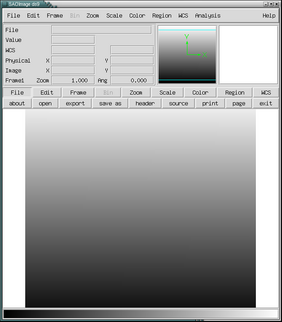
which DS9 will load the default image. The second is more interesting: it
creates an 1D inlined array of 262144 elements,
initialized to the values 1 through 512*512,
and transmits the result directly to DS9, resulting in a visual which
should resemble
Our next example reveals one of the most powerful features in the DS9
package, namely the ds9_put_array function. With it we can rewrite
the preceding example as
        isis> ds9_launch
        isis> ds9_put_array( [ 1 : 512 * 512] )
ds9_put_array method is faster and cleaner than alternatives, such
as dumping data to temporary files and explicitly constructing command strings
to pass to the system() function for launching external processes.
Instead, by fostering direct communication between S-Lang and DS9 we
avoid creating file litter which must be cleaned up later, as well as the
need to load additional software to read and write FITS
files. As a result the analysis process becomes more fluid and nimble,
promoting iterative exploration.
Similarly, if DS9 is already running then
isis> ds9_put_file ( "image.fits" )
The put functions described above have natural inverses. For example,
to retrieve the name of the file currently being displayed we might do
        chips> filename = ds9_get_file()
        chips> print(filename)
        image.fits
        chips> ds9_get_file
        image.fits
chips> image = ds9_get_array
        chips> image
        UChar_Type[900,900]
chips> image2 = sqrt(image)
Double_Type) as the square root
of the first, or
chips> ds9_put_array(image2)
See the function reference (in the next chapter) and test scripts.
Here's the simplest case showing how regions may be retrieved directly to a S-Lang string array
        isis> s = ds9_get_regions()
        isis> print(s)
        # Region file format: DS9 version 4.0
        # Filename: im1.fits
        global color=green font=\"helvetica 10 normal\" select=1 highlite=1 edit=1 move=1 delete=1 include=1 fixed=0 source
        image
        circle(268,257,20)
coord_sys qualifier
        isis> s = ds9_get_regions( ; coord_sys="physical")
        isis> print(s)
        "physical"
        "circle(4280.5,4104.5,320)"
isis> ds9_send("regions system physical")
isis> s = ds9_get_regions()
        isis> s = ds9_get_regions("/tmp/my.reg")
        isis> !cat /tmp/my.reg

        # Region file format: DS9 version 4.0
        # Filename: im1.fits
        global color=green font="helvetica 10 normal" select=1 highlite=1 edit=1 move=1 delete=1 include=1 fixed=0 source
        physical
        circle(4280.5,4104.5,320)
Our examples so far have treated images only as arrays of raw pixel values. We now highlight how coordinate systems may be attached to these images, thereby rendering them of greater practical significance to the astronomer.
Suppose we would like to attach a WCS transform described by the strings
        "CRPIX1    256"
        "CRVAL1    512"
        "CDELT1    2"
        "CTYPE1    X"
        "CRPIX2    256"
        "CRVAL2    512"
        "CDELT2    2"
        "CTYPE2    Y"
chips> ds9_view( [ 1 : 512 * 512] )
image.wcs, then
the command
chips> ds9_put_wcs_keys("image.wcs")
wcs, only now it would be invoked as
chips> ds9_put_wcs_keys(wcs)
Now suppose that we wanted to apply the transform not from formatted strings, but rather from raw S-Lang values. For example, we might apply the transform to the first axis of the image with
chips> ds9_put_wcs(256, 512, 2)
        chips> crpix = [256, 256]
        chips> crval = [512, 512]
        chips> cdelt = [2, 2]
        chips> ds9_put_wcs(crpix, crval, cdelt)
Now suppose that the arrays given in the preceding example were morphed into fields of the same name within an S-Lang structure, such as
        isis> s = struct { crpix, crval, cdelt, ctype, cunit}
        isis> s.crpix = crpix
        isis> s.crval = crval
        isis> s.cdelt = cdelt
isis> ds9_put_wcs_struct(s)
Both FITS and DS9 allow multiple coordinate systems to be associated
with an image. The DS9 module facilitates this by supporting an
optional alt_wcs_char parameter in each of its WCS functions.
For example,
isis> ds9_put_wcs_struct(s, 'a')
        isis> crpix = [256, 256]
        isis> crval = [512, 512]
        isis> cdelt = [2, 2]
        isis> ds9_put_wcs(crpix, crval, cdelt, , , 'p')
WCSNAMEP with value 'PHYSICAL'.
Note that in the above call ctype and cunit have been omitted
(positional parameters 4 and 5 are empty); their values will default to
NULL. More information on how DS9 treats alternate WCS is available
within the DS9 FAQ, which can be accessed through Help->FAQ->Coordinates
within the GUI.
A transform may be removed simply by replacing it with an empty transform, such as
chips> ds9_put_wcs_keys("")
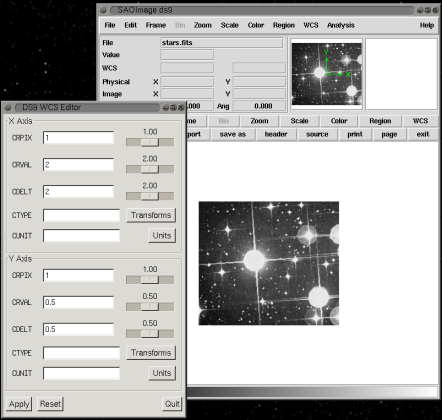
If you have SLgtk installed then you'll also be able to modify image WCS values from within the WCS editor guilet, launched via
ds9_wcs_edit
A DS9 process may be terminated either interactively from the GUI or programmatically via
isis> ds9_quit()
As discussed earlier in
Omitted_Arguments, order matters when
specifying optional arguments.
For example, consider ds9_clear(), which accepts 2 optional
arguments: a handle cannot be specified when this function is invoked
unless the frame argument is also specified. Fortunately, the API has
been coded to accept NULL as a default value in such cases. This
exploits the fact that omitted arguments delimited by commas default
to the value NULL in S-Lang, allowing such functions to be
conveniently invoked, for example, as
ds9_clear( , handle);
Note that some routines in the DS9 package do not return a value which can be inspected for an error condition. There are two reasons for this. One is that the package is intended primarily for interactive use, so when a function fails such will be immediately evident to the user. Second, functions can only return error codes when SAOds9 itself indicates that an error condition exists, but unfortunately this information is not returned to the caller in all cases.
While XPA supports sending to and receiving from multiple servers in a single call, the functions described here return results from at most 1 instance of SAOds9.